 Stopia
Using a Timing Game in the Classroom — 5 Math and Science Activities
A timing game can easily end up as a five-minute break activity, but with a little structure it becomes a lesson where students generate and analyse their own data. Results are precise to 1/100 of a second and anyone can take part straight away, which is what makes it such good classroom material.
Before the lesson
- A classroom computer and a TV or projector: Stopia runs in the browser with nothing to install, so it works even on school PCs where you can't install software.
- A button: If walking to the front is a hassle, pass round a wireless keyboard or gamepad. On a tablet, students can simply tap the screen.
- Player names: Enter each student's (or team's) name in Settings › Records and every result is saved under that name. After the lesson, use Export CSV to analyse the data in Excel or Google Sheets.
- Lock: Set a PIN lock in Settings › Operate so students can't change the settings.
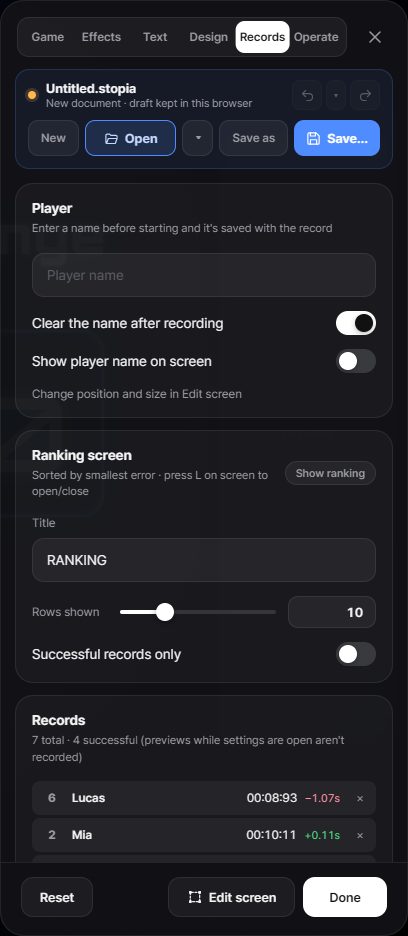
Results are stored only in the classroom computer's browser and are never sent to a server. Names stay on that machine, but it's still good practice to clear the records in the Records tab at the end of the lesson.
Activity 1. Putting error into numbers (Math)
Age: 10–14 · Time: 20 min · Learning: difference, absolute value, percentages
- Set the target to 10 seconds and give every student one try.
- Each student works out their difference from the target: 9.73 s is −0.27 s, and 10.41 s is +0.41 s.
- Ask "Who did better?" Let students discover for themselves that they need to ignore the sign and compare sizes. It's a natural moment to introduce absolute value.
- Convert errors to percentages: 0.27 s is 2.7% of 10 s. Then ask, "If the target were 20 seconds, what percentage would a 0.27 s error be?" This shows that the same error is a different proportion depending on the baseline.
Stopia's tolerance setting uses exactly this percentage idea. Finish by asking students to work out "With a 3% tolerance, which times count as a success?", then set it and test it. Seeing the numbers come to life helps them really understand what a percentage means.
Activity 2. Average and spread (Math and statistics)
Age: 12+ · Time: 30 min · Learning: mean, range, measures of centre
- In groups, each student has five tries and writes down every result.
- Everyone calculates their mean. Then ask: "Is the student whose average is closest to 10 seconds the best player?"
- For example, a student who swings between 8.5 and 11.5 seconds averages exactly 10, but missed by a lot every time. A student whose results cluster around 10.3 has a slightly worse average but is far more consistent.
- To capture the difference, calculate the range (maximum − minimum). Older students can go on to standard deviation.
The key idea is that "accurate" can mean two things: close to the target and similar every time. It leads naturally into accuracy and precision in science.
Activity 3. What changes our sense of time? (Science investigation)
Age: 10–18 · Time: 40+ min · Learning: hypotheses, controlling variables, experimental design
Start with the question "What affects how we sense time?" and have each group design an experiment. When students come up with their own hypotheses, the ideas are often more varied than you'd expect.
| Independent variable | How to compare |
|---|---|
| Can you see the clock? | Normal mode vs blind mode (Settings › Effects) |
| Eyes open or closed | Blind mode with eyes open vs closed |
| Background noise | Silence vs fast music |
| Counting method | Silently vs "one Mississippi, two Mississippi" |
| Target length | 5 s vs 10 s vs 20 s — does the error grow with the target? |
Make sure to discuss control variables: the same student, the same button and the same number of tries for a fair comparison. Also let students spot that if they do all of one condition first, the second condition benefits from practice. Alternating between conditions solves this.
Export the results as CSV and draw a bar chart of the average error for each condition, and the results section of the report is done. The "target length" experiment usually shows larger errors for longer targets, which makes for a good discussion.
Activity 4. Team contest (Whole class)
Age: all · Time: 15 min · Goal: teamwork, class atmosphere
- Each team decides its order. Make sure every student gets a turn.
- Enter the team names as player names in Settings › Records.
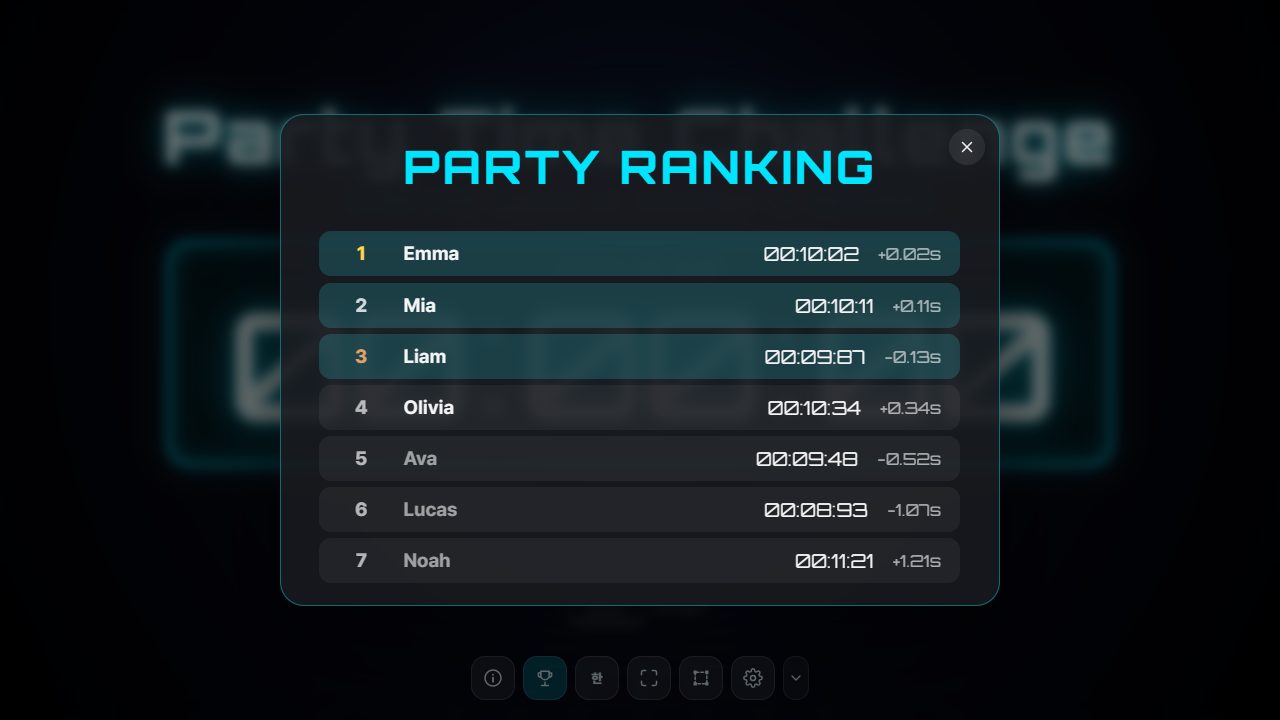
- Score each team by the total error of all its members, not individual rank. One star player isn't enough; everyone has to do well, so students start coaching each other.
- For the last round, turn on blind mode and the dramatic reveal to raise the excitement.
If the target is always the same, later players have an advantage. Turn on Random target every round in Settings › Game to even things out.
Activity 5. A one-minute focus starter
Use this when the class is unsettled after a break, since it only works if the whole room is quiet. Turn on blind mode and the dramatic reveal, and invite one student to the front to try the 10-second challenge. Everyone else counts silently along with them, and when the button is pressed, before the result appears, they raise a hand for either "too early" or "too late". When the result is revealed, half the room cheers. Because you have to count quietly to get it right, the class settles and all eyes are on the front within about a minute.
Customising the screen for your class
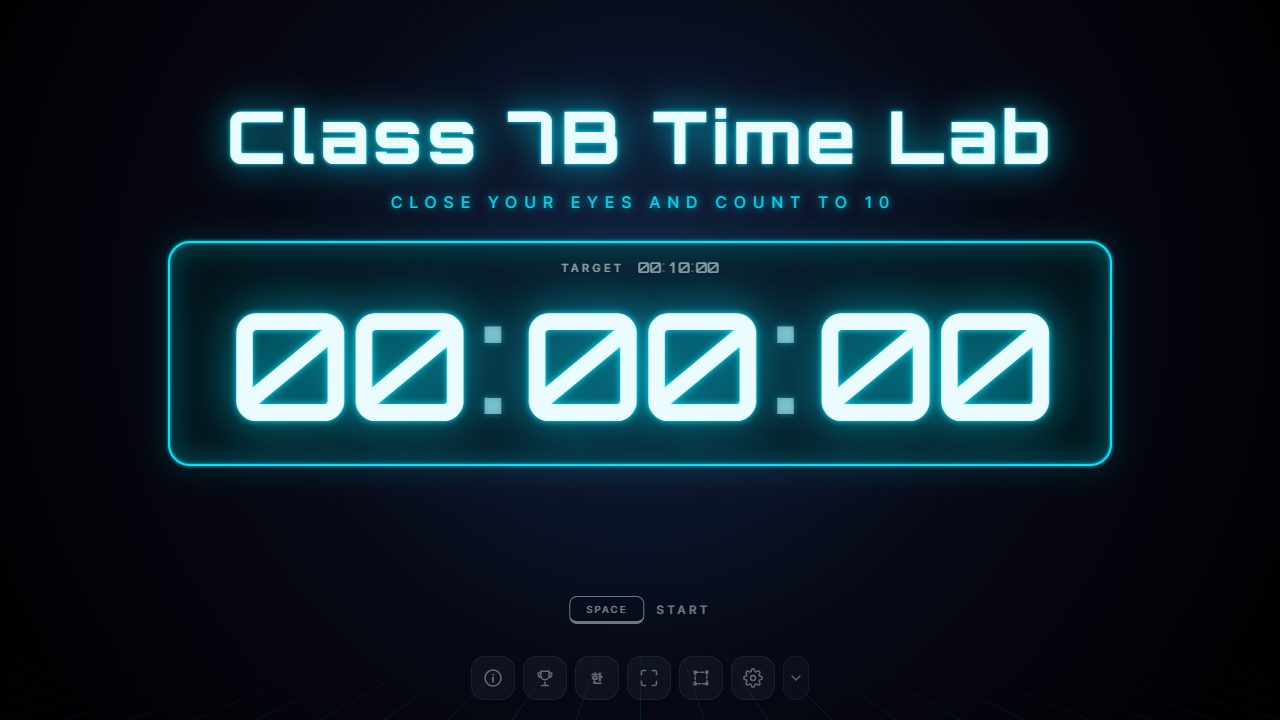
- Title and text: In Settings › Text, change the title to something like "Class 7B Time Lab", and adjust the success and fail messages to suit the lesson.
- Save it: Save your setup as a
.stopiafile and you can reuse it with other classes or next term. - Sound: Turn the sound effects off or down in Settings › Effects if they would disturb the class next door.
Wrapping up
The great thing about a timing game is that every student generates their own data under the same conditions. Calculating averages and drawing graphs from numbers they produced themselves sticks far better than textbook examples. For students curious about time perception itself, share how to nail the 10-second challenge as well.